It's one workbook, three tabs, and two or three formulas — no power-user skills, paid template, or subscription required. The piece that matters is a single place where the recipes you actually cook and the ingredients you actually have can talk to each other.
The spreadsheet isn't magic. The Sunday afternoon habit is.
TL;DR Quick Answers
excel recipe inventory template
An Excel recipe inventory template is a single workbook with three tabs (Recipes, Ingredient Inventory, and Cost and Yield) that ties what you cook to what's in the pantry. It tracks ingredient quantities, flags low stock, and calculates cost per serving automatically. Home cooks use it to cut waste and grocery spending. Personal chefs and small caterers use a more detailed version for portion control and pricing. For a kitchen-grade build with pre-set cost and yield formulas, the professional Excel recipe template with inventory from Chefs Resources is the closest reference point.
Top Takeaways
Structure beats memory. A simple spreadsheet outperforms a notebook every time.
Three tabs are enough to start: Recipes, Ingredient Inventory, and Cost and Yield.
Naming discipline wins. Use the same exact name for each ingredient across every tab. Excel reads spelling variations as separate items, and that's where most home sheets break down.
Conditional formatting on par levels turns the inventory tab into a self-updating shopping list.
A standardized recipe and a tracked ingredient stock turn Excel into a working kitchen system rather than a digital recipe binder.
Why an Excel Recipe Inventory Beats Paper or a Notes App
Paper cards stain, and they wander. Notes apps search well enough, but they won't reprice a recipe when butter jumps, they won't tell you the chicken stock ran out two weeks ago, and they won't scale four servings up to twelve for a Sunday dinner. Excel handles all of that on a file most of us already have on the computer in the kitchen drawer.
Two shifts matter once recipes live in a spreadsheet. The first is sorting and filtering. Every recipe becomes searchable by ingredient, prep time, meal type, cost per serving, or any field you care about. The second is math. Change the unit price of olive oil in one cell and every recipe that uses olive oil reprices itself across the workbook. The pantry list and the recipe list stop drifting apart because they're now the same document.
That last point is what turns a recipe sheet into an actual inventory system.
When Excel earns its place in your kitchen
Excel works best when:
You cook eight or more recipes regularly.
You shop weekly for fresh ingredients.
Cost per serving matters to your household budget.
You batch-cook, freeze, or cook for a family of four or more.
Skip Excel if:
You make the same three or four dishes every week.
You rely mostly on meal delivery or takeout.
Food spend isn't on your radar this season.
You cook for one and rarely plan ahead.
Most home cooks I've worked with land in the first group. If you do too, the rest of this article is the setup that pays back the time inside a month.
The Core Tabs Your Spreadsheet Needs
Keep the structure small at first. The setup that works for almost every home kitchen, personal-chef gig, and small catering operation comes down to three tabs.
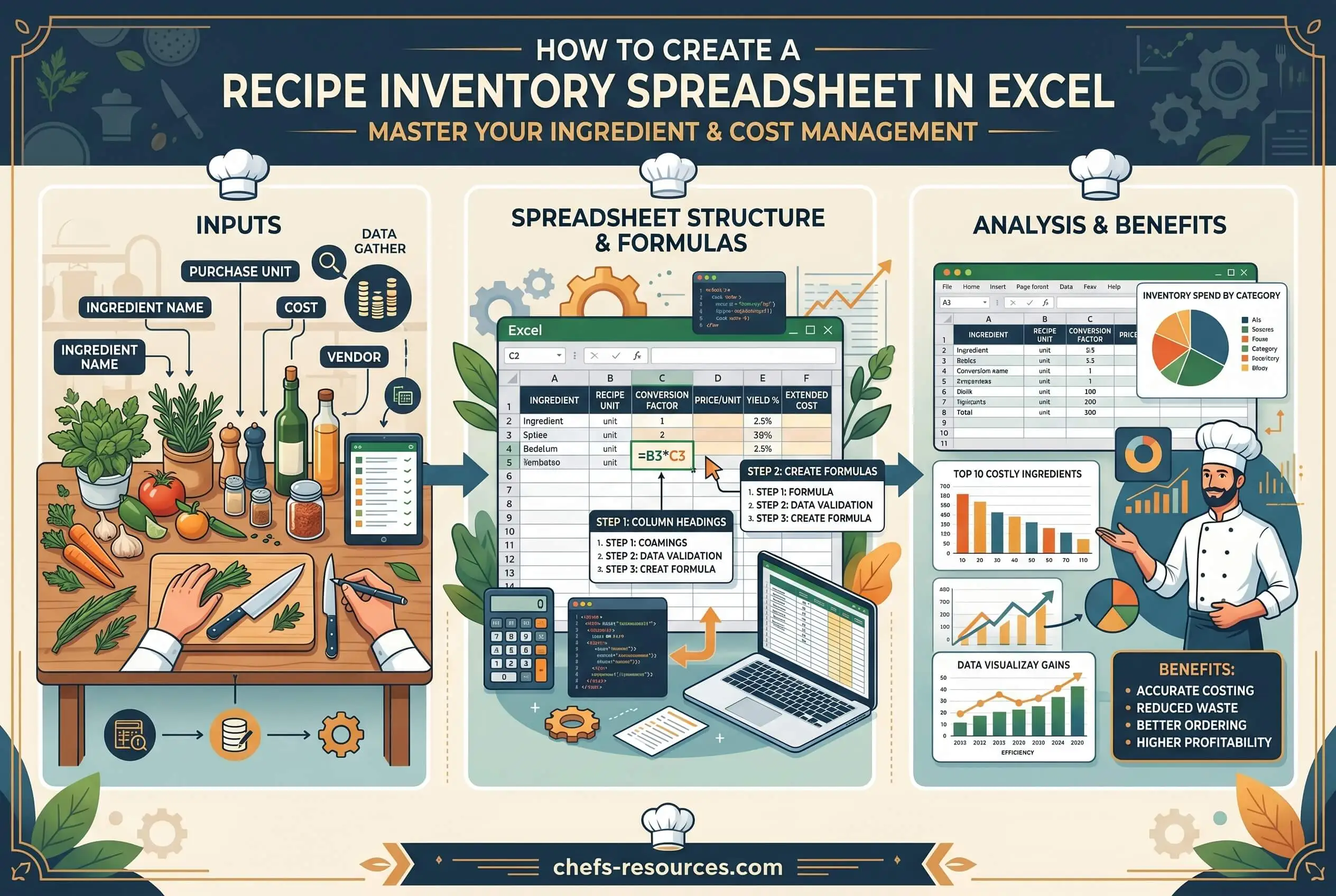
Tab 1, Recipes. One row per recipe. Columns: Recipe Name, Category, Servings, Prep Time, Cook Time, Ingredient List, Method Notes, Cost per Serving.
Tab 2, Ingredient Inventory. One row per ingredient. Columns: Ingredient Name, Unit, Quantity on Hand, Par Level, Unit Cost, Last Updated.
Tab 3, Cost and Yield. The working tab where the math runs. It pulls quantities from the Recipes tab, multiplies them by Unit Cost from the Inventory tab, and returns Cost per Serving back to each recipe.
Use the same exact ingredient name across all three tabs. "Olive oil" and "olive oil, extra virgin" will read as two different things to Excel, and the formulas will break the moment they disagree.
My honest take: I've watched home cooks build elaborate cost-per-serving formulas before they've settled on a single name for "butter." Skip the showy stuff. Get the tab structure and the naming right first.
Step-by-Step Setup in Excel
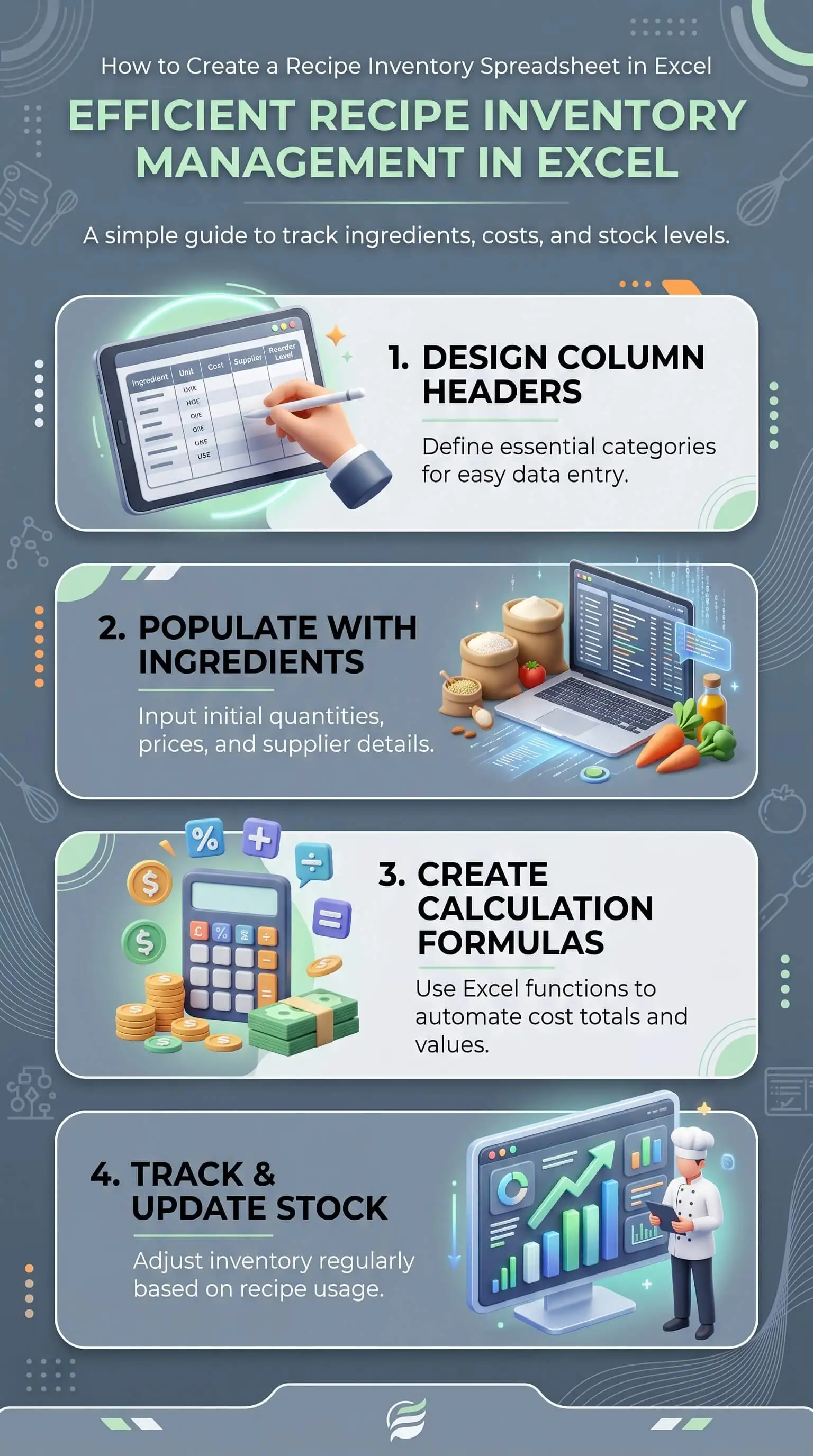
Open a blank workbook. Rename the three default sheet tabs to Recipes, Ingredient Inventory, and Cost and Yield.
On the Ingredient Inventory tab, type your column headers across row 1: Ingredient Name, Unit, Quantity on Hand, Par Level, Unit Cost, Last Updated.
Enter a starting pantry list. Fifteen to twenty staples is plenty for the first pass. You'll add the rest as you cook.
On the Recipes tab, set up columns for the recipe details listed above. In the Ingredient List column, use Excel's Data Validation feature to create a drop-down menu that pulls from the Ingredient Name column on your Inventory tab. The drop-down prevents the typos that quietly break SUMIF formulas later.
On the Cost and Yield tab, use a SUMIF formula to look up each ingredient's unit cost and multiply it by the quantity used. The basic syntax is =SUMIF(Inventory!A:A, "ingredient name", Inventory!E:E) * quantity.
Add a Cost per Serving formula in the Recipes tab. Total recipe cost divided by servings does the job.
Apply Conditional Formatting on the Inventory tab so any row where Quantity on Hand drops below Par Level highlights in red. That single rule turns the Inventory tab into a self-updating shopping list.
Save the workbook as an Excel Template file (.xltx). Every new recipe project now starts from this structure instead of a blank page.
Common Mistakes That Break the Spreadsheet
Four issues come up over and over with home-built recipe sheets:
Mixed units in the same ingredient row, like cups one week and grams the next.
Duplicate ingredient names with slightly different spellings.
Hard-coded prices typed into individual recipes instead of pulled from the Inventory tab.
No version control, which usually means somebody overwrote the master file with a single-use copy.
Fix the units and the naming first. In my experience helping home cooks build these sheets, those two account for the majority of broken formulas I see. The other two get easier once the foundation is consistent.
“In any kitchen, the spreadsheet only works if the column names are boring. Boring means consistent. The minute someone writes ‘tomato’ on one line and ‘tomato, diced’ on another, your inventory count is wrong and your costs are wrong. What I tell new cooks is this: spend the first hour naming things, not building formulas. Once the names hold steady, the math takes care of itself. Excel rewards discipline at the top of the sheet. Everything downstream falls into place when you’ve earned it.”
7 Essential Resources
A short list of templates and tools that pair well with the three-tab structure above. We use several of these alongside our own setup when we're helping someone start from scratch.
01. 101 Planners, Free Editable Recipe Template
https://www.101planners.com/recipe-template/
The Excel version doubles as a recipe cost calculator. Useful starting point if you want to skip the column setup and jump straight to entering recipes.
02. Vertex42, Inventory Spreadsheet Templates
https://www.vertex42.com/ExcelTemplates/inventory.html
A clean library of Excel inventory sheets you can adapt for pantry tracking. The Inventory Control Template is the closest match for home kitchen use.
03. Vertex42, Home and Family Templates
https://www.vertex42.com/ExcelTemplates/home-and-family.html
Editable meal planners, grocery lists, and recipe cards. Best for the front-end recipe and meal-planning side of the workflow that pairs with your inventory tab.
04. The Good Docs, Recipe Templates for Google Sheets and Excel
https://thegoodocs.com/freebies/recipe-templates-google-sheets/
Pre-built layouts with sections for ingredients, quantities, prep time, and built-in cost breakdowns. Free downloads in both Excel and Google Sheets formats.
05. New Orchards, Excel Recipe Card Templates
https://www.neworchards.com/templates/recipe-card
Compact, printable recipe card formats in Excel. Useful when you want a one-page card to pin to the fridge alongside the master spreadsheet.
06. Chefs Resources, Excel Recipe Templates Hub
Professional kitchen templates with built-in food cost tables and scalable yields. Heavier than a home cook needs, but a strong reference for how production kitchens structure their sheets. Worth a look once your home version is humming.
07. ReFED, Food Waste Monitor
https://insights-engine.refed.org/food-waste-monitor
Not a template. The dataset that explains why inventory tracking matters at the household level. Worth bookmarking if you want to size the problem your sheet is solving.
3 Statistics
Three numbers explain why this is worth your Sunday afternoon.
1. Food Waste Is a Documentation Problem
USDA estimates that 30 to 40 percent of the US food supply is wasted each year.
That figure tracked roughly 133 billion pounds and $161 billion in lost food at the retail and consumer levels in the baseline study.
Common kitchen causes include inconsistent portioning, no yield guidance, and missing reuse notes for leftovers.
Source: USDA Food Loss and Waste, https://www.usda.gov/about-food/food-safety/food-loss-and-waste/food-waste-faqs
2. The Average US Family Loses Nearly $3,000 a Year to Wasted Food
The EPA's 2025 estimate puts the cost of food waste at $728 per person per year, or $2,913 for a family of four.
That breaks down to roughly $56 a week walking into the trash.
A working Cost per Serving formula in Excel surfaces where the money is actually going.
Source: EPA Food Waste Research, https://www.epa.gov/land-research/food-waste-research
3. Foodborne Illness Tracks Back to Process Gaps
The CDC estimates that 48 million Americans get sick from foodborne illness each year. 128,000 are hospitalized and 3,000 die.
Many home incidents trace back to documentation gaps. Missing temperature notes, unclear holding times, and skipped prep order are the usual culprits.
A standardized recipe template is a small but real safety control in the home kitchen.
Source: CDC Food Safety Facts and Stats, https://www.cdc.gov/food-safety/data-research/facts-stats/index.html
Final Thoughts and Opinion
Most kitchens use Excel as a recipe box and stop there. The shift that matters is treating the spreadsheet as the inventory system first, with recipes layered on top. Until that happens, the food keeps walking into the trash.
After helping a few dozen households set these sheets up, three things separate the ones that stick from the ones that don't:
The sheet gets opened on a schedule, not when someone remembers. Sunday afternoon, before the grocery run, every week. No exceptions.
The person who shops also looks at the Quantity on Hand column. When buying and tracking happen in the same head, over-purchasing drops fast.
Empty cells trigger curiosity, not stress. The point isn't catching yourself out. The point is understanding where the food and the money actually went last week.
Our honest take: most home recipe spreadsheets fail because they're built to look impressive instead of to be used. The setup that lasts is the one that opens cleanly on a phone, has the right ingredients in the drop-down, and doesn't punish you for missing a week.
What surprises new users is how fast the spreadsheet stops feeling like work and starts feeling like a quiet second brain. The grocery list writes itself. By the second month, you've stopped opening the fridge to figure out dinner because the sheet already told you what's in there. And the same dish costs the same to make every time, which is a thing you can show to anyone who asks.
Build the smallest version that works for you this week and add to it after. The point isn't a flawless template. The point is a sheet that supports steady farming decisions, stays useful through each planning cycle, and is actually open on Sunday afternoon when you sit down to plan.
Frequently Asked Questions
What is the best Excel recipe inventory template for beginners?
The best template is the simplest one you'll actually use. Start with a workbook of three tabs (Recipes, Ingredient Inventory, and Cost and Yield) and a single SUMIF formula for cost. Most paid templates do far more than a home cook needs, and the extra complexity gets in the way of consistent use. In our experience, the sheet that survives month three is always plainer than the one you imagined building.
Can Excel calculate recipe cost per serving automatically?
Yes. Set up a Unit Cost column on the Ingredient Inventory tab, use a SUMIF formula on the Cost and Yield tab to pull each ingredient's cost into the recipe, then divide the total by the number of servings. Update the unit prices once, and every recipe replaces it automatically. That single feature is the reason most home cooks stop hand-pricing recipes after week one.
How do I link ingredient inventory to my recipes in Excel?
Use Data Validation to create a drop-down menu on the Recipes tab that pulls from the Ingredient Name column on your Inventory tab. That keeps ingredient names identical across both tabs, which is what makes formulas like SUMIF and VLOOKUP work reliably. Skip this step and the formulas break the first time someone types "yellow onion" instead of "onion, yellow."
Should I use Excel or Google Sheets for recipe inventory?
Either works. Excel handles large workbooks faster and has more advanced formula options. Google Sheets is easier if you want to share the file with a partner or open it from any device. The structure described in this guide works the same in both. Pick the one you'll actually open on a Sunday afternoon.
How often should I update my recipe inventory spreadsheet?
Update the Quantity on Hand column once a week, ideally before your grocery trip. Update Unit Cost monthly or when you notice prices have shifted. Update the recipe list whenever you cook something new that you want to keep. Weekly cadence beats daily ambition every time. The households we've seen abandon their sheets all attempted daily counts in week one.
Start Building Your Sheet This Week
Open Excel today, build the three tabs above, and load just the recipes you're cooking this week. By next month the sheet will be doing the planning work for you, and the grocery bill will tell you it's working.
Start today
Open a blank workbook. Name three tabs: Recipes, Ingredient Inventory, Cost and Yield.
Enter fifteen pantry staples on the Inventory tab with units and current prices.
Add this week's recipes to the Recipes tab.
Set up Data Validation drop-downs to link Recipes to Inventory.
Within the first month
Add Conditional Formatting on par levels so low stock highlights automatically.
Do a full pantry count and update Quantity on Hand.
Add the SUMIF formula on Cost and Yield to surface cost per serving.
Keep it running
Update Quantity on Hand weekly, before grocery shopping.
Refresh Unit Cost monthly or when prices shift.
Add new recipes as you cook them. Delete the ones nobody asked you to make twice.
For a deeper foundation on recipe structure before you build the spreadsheet, see our walkthrough on how to create a simple recipe template for beginners. For the cost and waste angle in more depth, our guide to maximizing profit on your farm with expert tips and strategies covers the same principles at production scale. And if your inventory work leads you toward freezer storage, how to freeze peaches for smoothies and baking while keeping taste walks through the technique that keeps stored ingredients usable for months.